What Does a Bespoke Software Project Actually Look Like?
A bespoke software project shouldn't feel mysterious. No 200-page spec, no vanishing for six months. Just: understand the problem, build the smallest useful version, get it in front of real users fast, then improve it. Sixteen stages, one simple principle — outcome, not launch, is success.

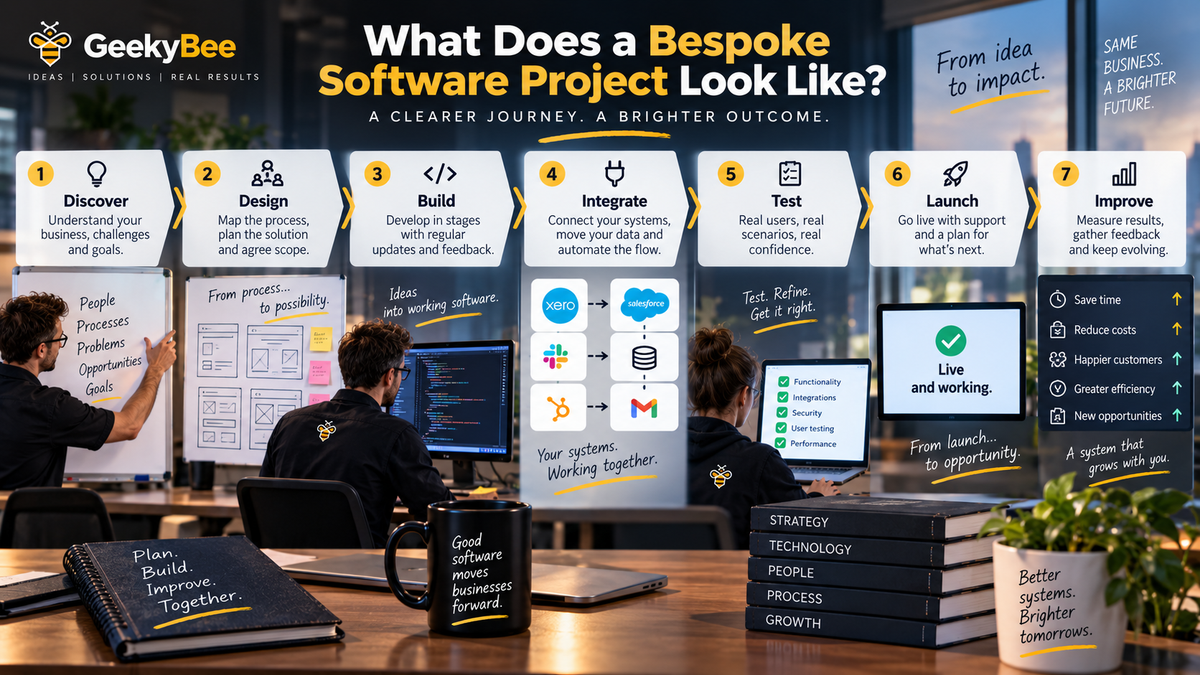
From first conversation to live system — the process, step by step
You've decided your business might benefit from bespoke software. You've identified the problem. You've spoken to a developer. The numbers make sense.
So what happens next?
For businesses that haven't commissioned software before, this part can feel slightly mysterious. Do we need to write a 200-page specification? Will there be months of meetings? Do we need to understand programming? When do we actually see something? And how do we know we're going to get what we thought we were buying?
The good news is that a bespoke software project doesn't need to be particularly mysterious. At least, I don't think it should be.
The process I prefer is actually quite straightforward:
Understand → Design → Build → Test → Launch → Learn → Improve
Let's walk through what that means in practice.
Stage 1: We Don't Start With Software
This might seem an odd place for a software developer to begin. But the first stage shouldn't really be about software at all — it should be about the business.
Imagine a company tells me:
"We need a new booking system."
Fine. But that's not enough information to start developing anything.
I'd want to know: why? What's wrong with the current system? Who uses it? What information do they need? What happens before a booking, and what happens afterwards? Are payments involved? Are there cancellations? Do customers need reminders? Does anything need to happen internally when a booking is created? What other software is involved? Where are people currently doing things manually?
And perhaps most importantly:
What would a better version of this process actually achieve?
Sometimes you discover the booking system isn't the problem at all. The problem is what happens around it. That's why the first stage is discovery.
Stage 2: Follow the Process — Not the Org Chart's Idea of It
One of the most useful things we can do is map what happens today. Not what management thinks happens. What actually happens. Those can occasionally be two rather different things.
Take a customer enquiry. It arrives through the website. Someone receives an email. They copy the information into the CRM. They check another system. They send an email to the customer. The customer responds. Someone creates a booking. Accounts sends a payment link. The customer pays. Someone updates a spreadsheet. A confirmation gets sent.
That's the process. Now we can start asking questions.
Why is that information being copied? Why does somebody need to check the second system manually? Why isn't the payment link created automatically? Why does the spreadsheet exist? Why does a person need to send the confirmation?
Some steps will have perfectly good answers. Others won't. That's where the opportunities begin to appear.
Stage 3: Decide What We're Actually Solving
This is where scope becomes important. Because once you start examining a business process, you'll almost certainly discover lots of things that could be improved.
That's dangerous — not because improvement is bad, but because suddenly the project that was supposed to solve one problem is trying to solve 17.
So we define the objective. Perhaps:
Reduce the amount of administration required to process a new booking by 80%.
Now we have something to test decisions against. Does Feature X help achieve that? Yes — potentially include it. No — perhaps it belongs somewhere else.
A clear objective protects a project from turning into a technology wishlist.
Stage 4: Look at What Already Exists — And Decide What Not to Build
Before building anything, I'd look at the systems already in place. Can we keep them? Can they be integrated? Do they have APIs? Is the data accessible? Is there an existing commercial product that already solves part of the problem? Could automation bridge the gap? Could AI handle one particular stage?
This is an important part of bespoke development that isn't really development at all:
Deciding what not to build.
If Xero already does the accounting perfectly well, I'm not building accounting software. If your CRM works, we'll use the CRM. If your booking platform exposes a good API, perhaps we build around it rather than replacing it.
Every existing component we can sensibly retain reduces cost, development time and risk.
Stage 5: Design the Solution
Now we can start talking about the new system. What does it need to do? Who will use it? What information does each person need? What happens when they click something, and what happens automatically? Which systems communicate? Where does data live, and who can access it? What happens if something goes wrong?
At this stage we might produce process diagrams, wireframes, screen designs, data models, integration maps and technical architecture.
Not every project needs every one of those. A small internal automation doesn't need the same design process as a commercial SaaS platform with thousands of customers. The amount of design should be proportionate to the project — but everyone should understand what we're building before we spend significant time building it.
Stage 6: Define Version 1 — Not Version 10
This is one of the most important conversations in the whole project.
What does the first version actually need to do? Not: what could it eventually do? That's a very different question.
Suppose we identify 25 possible features. Perhaps only eight are actually necessary to solve the original problem. Build the eight. Get people using them. The other 17 haven't disappeared — we've simply avoided paying for them before knowing whether they're needed.
I much prefer useful software in people's hands to perfect software permanently six months away.
Stage 7: Build Something You Can Actually See
This is where software development has changed quite significantly. Historically, businesses could sometimes wait months before seeing anything beyond specifications and designs. I don't particularly like that approach.
Modern development tools — especially AI-assisted development — let us prototype and build working interfaces much faster. That means I want users seeing things early.
Here's the dashboard — does this make sense? Here's the booking workflow — is this how you expected it to behave? Here's what happens when a customer submits the form — is anything missing?
This is incredibly valuable, because humans are generally much better at reacting to something they can see than imagining something described in a document.
Show somebody a specification and they'll say "looks fine." Show them the actual screen and they'll immediately say "oh, that button needs to be over there."
That's useful feedback. I'd rather get it now than after launch.
Stage 8: Build in Stages, Not in One Big Reveal
Even relatively small applications contain different components. So instead of disappearing for three months and returning with "ta-da, software!", I'd rather build in logical stages — something like:
- Phase 1: Core users and database
- Phase 2: Main business workflow
- Phase 3: External integrations
- Phase 4: Automation and AI
- Phase 5: Reporting
- Phase 6: Polish, testing and launch
The exact phases depend on the project, but the principle stays the same: build, review, confirm, continue. That gives you visibility, and gives the developer opportunities to correct assumptions before they become expensive ones.
Stage 9: Integrations
This is often where bespoke software becomes particularly valuable.
Very few modern business systems operate completely independently. The new application might need to talk to a CRM, accounting software, a booking platform, payment providers, email, SMS, telephony, document storage, social media platforms, AI services, or internal databases.
Ideally, these connections happen through APIs — we authenticate with the other system, exchange the information we need, and handle the response. This is also where good error handling becomes important: what happens if the CRM is unavailable? If a payment fails? If an API responds slowly, or the other company changes something without warning?
Production software needs answers to those questions.
Stage 10: AI — If AI Actually Helps
Increasingly, AI appears somewhere in these conversations. But I wouldn't add AI simply because everyone's talking about AI. Use it where it provides genuine value.
AI is particularly useful where the system needs to understand information that isn't neatly structured — emails, documents, phone conversations, images, natural language, customer questions, large amounts of text. It's also useful for analysis, recommendations and decision support.
But if a simple rule can reliably do something, use the rule. You don't need artificial intelligence to calculate VAT. Use the simplest technology capable of solving the problem properly.
Stage 11: Testing Isn't Just Checking Whether the Buttons Work
Obviously we test whether the software functions. But that's only part of it — we also need to test assumptions.
What happens if somebody enters the wrong information? If they press the button twice? If the internet connection drops? If an external system doesn't respond? If a user tries to access something they shouldn't? What happens with 10,000 records instead of ten?
And perhaps most importantly:
Can real users actually use it?
Developers are terrible test users for their own software — we know how it's supposed to work. Real users don't. Give it to someone who hasn't been involved in development, watch what they do, and don't immediately explain it. You'll learn an enormous amount.
Stage 12: Security
Security shouldn't suddenly appear at this stage — it should have been considered throughout the project. But before launch, we need the production environment properly prepared.
Depending on the application, that could include authentication, user permissions, encryption, secure API credentials, backups, audit logging, data retention, GDPR requirements, vulnerability checks, rate limiting, monitoring and recovery procedures.
Security should be proportionate to the data and risk involved — an internal tool holding no personal information has a different risk profile from a healthcare platform. But every production system needs security considered deliberately.
Stage 13: Data Migration
If the new software replaces an existing process, we may need to bring existing data with us. This can be wonderfully straightforward, or spectacularly unpleasant — the difficulty depends largely on the quality of the existing data.
You may discover duplicate customers, missing fields, inconsistent dates, different spellings, old records nobody understands, or multiple versions of the same information.
The technical act of importing data is often the easy bit. Working out which data is actually correct can be considerably harder. Worth investigating early.
Stage 14: Launch
Eventually we reach the exciting bit — people actually start using it.
But even here, I prefer controlled launches where practical. Perhaps one department goes first, or a handful of customers, or the old and new systems run alongside each other briefly. The objective is to reduce risk. If something unexpected happens with 20 users, that's generally easier to deal with than discovering it simultaneously with 20,000.
Once we're confident, we expand.
Stage 15: Watch What Actually Happens
This is where the project becomes really interesting: real usage.
Which features are used? Which aren't? Where do users hesitate? What takes longer than expected? What errors occur? What questions does support receive? Did we actually reduce the administration? Did response times improve? Did the thing we built solve the thing we intended to solve?
Because launch isn't success.
Outcome is success.
Stage 16: Improve It
Now we have something far more useful than assumptions: evidence.
Perhaps users desperately want one of the features we left out of Version 1. Excellent — build it. Perhaps another feature everyone thought was essential turns out to be irrelevant. Excellent — we saved ourselves the cost of building it. Perhaps somebody discovers a completely new use for the system. Even better.
Software should evolve with the business. That's one of the biggest advantages of having something built around your organisation, rather than the other way round.
How Long Does All This Actually Take?
It depends on the scale of the project. A focused integration or automation might take a few weeks. A substantial internal application might take a couple of months. A complex commercial platform could take considerably longer.
But I wouldn't judge progress simply by the date on which the entire project is "finished." I'd ask instead:
How quickly can we get something useful working?
That's a much more interesting measure. If we can solve 50% of the problem in four weeks and start generating value, I'd rather do that than wait six months for 100%.
How Involved Does the Customer Need to Be?
More than some people expect.
You're not expected to write code. But you do need to make decisions. The developer understands software. You understand your business. We need both.
Someone needs to explain how processes work, confirm business rules, review interfaces, test workflows, answer questions, prioritise features and provide feedback.
Projects become difficult when the business effectively says: "Here's the idea. See you in six months." The best results tend to come from collaboration.
What Should You Expect From Your Developer?
Visibility.
You should know what's happening. You should be able to see progress. You should understand what's being built next. You should know when something is proving more difficult than expected, and when a decision is required from you. And you should feel comfortable asking questions.
Software development contains uncertainty. That's unavoidable.
Mystery isn't.
What Happens If We Change Our Minds?
You will. That's normal. The trick is changing your mind cheaply.
Changing a diagram costs almost nothing. Changing a prototype is relatively inexpensive. Changing a completed feature is more expensive. Changing a system after 50,000 customers already depend on it is considerably more expensive still.
That's why the process should encourage feedback as early as possible.
The earlier we discover we're wrong, the cheaper being wrong becomes.
That's one of the most important principles in software development, full stop.
What Does a Good Project Actually Feel Like?
Probably less dramatic than you imagine. You shouldn't spend six months worrying about what's happening behind a curtain.
It should feel like a series of increasingly tangible steps: we understand the problem, we can see the process, we've agreed what we're solving, we've designed the approach, there's something on screen, now it works, now it connects, now real users are trying it, now it's live, now we're improving it.
The technology underneath may be complicated. The experience for the customer shouldn't have to be.
The Software Isn't Really the Project
This is perhaps the most important point in this whole article.
The project isn't:
"Build a piece of software."
The project is:
"Change something about the way the business works."
The software is simply the mechanism. If we build a technically brilliant application and the business works exactly as inefficiently as it did before, the project has failed. If we build something relatively simple that saves 50 hours a week, improves the customer experience, and lets the company grow without adding another three administrators — that's a successful technology project.
At GeekyBee, that's how I prefer to approach bespoke development. Start with the business. Understand the problem. Build the smallest thing capable of solving it. Get it into people's hands. Measure what happens. Then improve it.
Understand. Build. Learn. Improve.
Software development doesn't need to be a leap into the unknown. Done properly, it's a series of relatively sensible decisions that gradually turn a business problem into a working solution.
Wondering what this would actually look like for your business? Get in touch with GeekyBee — we'll start at Stage 1, with a conversation about the problem, not the software.