Helix: The Encrypted Vault That Nobody Can Open Alone

Published by GeekyBee | geekybee.net
Think about the most sensitive information your organisation holds right now.
The bank account details. The platform logins. The contracts. The succession instructions. The things that absolutely must survive if the wrong person leaves, dies, or is compromised.
Now ask yourself honestly: where does that information actually live?
For most organisations, the answer is uncomfortable. Email threads. A shared spreadsheet someone set up five years ago. A password manager where one admin has the master key. A document in a folder that three people can access and nobody audits. Or, worse, in the head of one senior person who has never written it down.
When something goes wrong — and eventually something always does — the information either disappears with that person, or it surfaces somewhere it should never have been.
Helix was built to make that problem permanently, cryptographically, governably solved.
What Is Helix?
Helix is a zero-knowledge encrypted vault — a secure, governed place for passwords, account credentials, legal documents, contracts, instructions, and files that trusted people need to reach when the person who usually handles them cannot act alone or cannot act at all.
Built and operated by GeekyBee Limited, Helix lives at helix.geekybee.net.
It is not a shared folder. It is not a secure Dropbox. It is not a password manager with a master login.
It is a governed vault where secrets are scrambled in your browser before they ever reach the server, organised into departments with strict witness rules, and where no single person — not your staff, not your attorney alone, not GeekyBee — can open it without witnesses present.
Think of it as a digital dead man's letter — a secure place for everything that must survive a key person's absence.
The Problem Most Organisations Don't Talk About
The risks are real, they're common, and they're rarely addressed until they cause a crisis:
The single-admin problem. One IT administrator or director has access to everything. When they leave — or worse — so does the information. Or it stays, accessible to them long after they should have been locked out.
The cover-each-other problem. Colleagues are meant to check each other's work, but in practice, they cover for each other. "I'll just peek at that and update it myself." No witness. No record. No accountability.
The update-as-excuse-to-read problem. Changing a password becomes a convenient reason to read the old one. Nobody notices. Nobody logs it.
The silent-browsing problem. Someone with access quietly looks at information they shouldn't. No alert. No audit. No way to know it happened.
The vendor-back-door problem. Your hosting or software provider could, in theory, access your data. Most don't. But can you prove they didn't?
Helix addresses every one of these — not through policy, but through cryptography and governance that the code itself enforces.
Who Helix Is For
Helix is built for organisations where sensitive information needs to survive the people who currently hold it, and where accountability matters:
Law firms and legal practices — client account details, succession instructions, trust documents. The Vault Master model (attorney-led, ceremony-controlled full export) maps directly onto how serious firms already think about segregation of duties.
Management companies and estates — artist earnings, platform credentials, royalty portals, contracts. When a principal is unavailable, the right people need access to the right things — nothing more.
Family offices and private clients — financial account details, property documents, emergency instructions. Structured survival planning, not "it's all in the email somewhere."
Any organisation where "one person knows everything" is a risk — because it always is.
How Helix Is Organised
Each client gets their own completely isolated vault:
- Their own encrypted file — one
.helixfile, isolated from every other client, bound to their specific domain and server - Their own domain — typically a subdomain like
vault.yourcompany.com. Your main website stays exactly where it is. - Their own panel — between 3 and 12+ trusted people who witness access according to strict rules
- Their own sections — departments you define at setup: Legal, Accounts, Digital, Marketing, HR — whatever fits your organisation
Every item in the vault lives in a section. Every section has its own members, its own department head, and its own witness rules. You can only access sections you belong to.
The Three Levels of Access
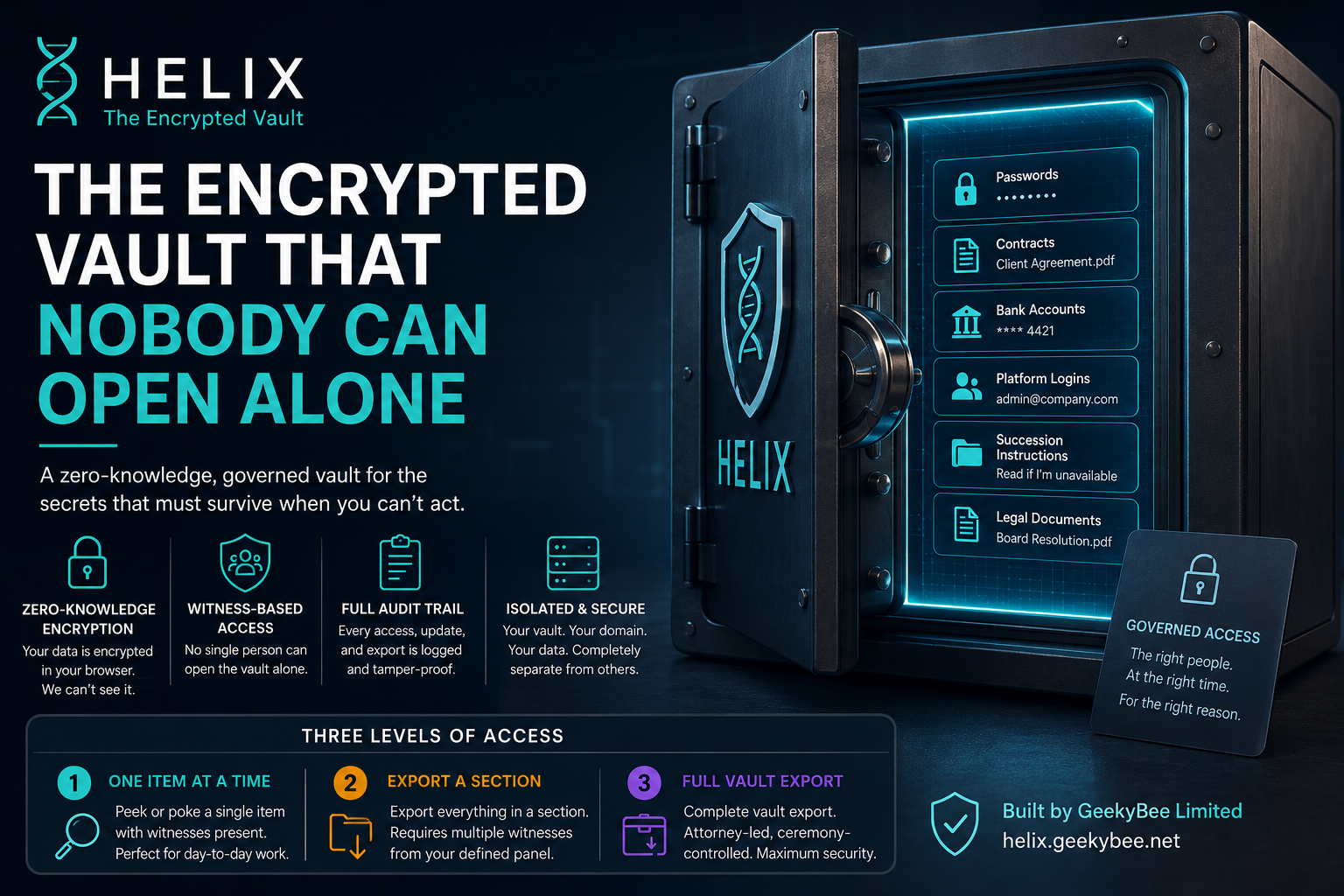
This is the heart of Helix. Access isn't binary — it's not "can get in" or "can't get in." There are three distinct levels, each with different rules about who can request access and who must be present to witness it.
Level 1 — One Item at a Time
This is day-to-day work. Two operations: peek (read a value) and poke (update a value). The names are deliberate — borrowed from old computing, chosen because they describe exactly what's happening.
Peek — reading a stored value
Say Sarah in Accounts needs to retrieve the royalty portal login. She requests a peek. Her witness must be someone from outside the Accounts section — James in Legal, for example, who has no access to Accounts. James gets a notification, opens Helix, sees Sarah's photo and her stated reason, enters his authenticator code, and confirms. Sarah's browser decrypts and displays the credential. A timer runs. The screen clears. The audit log records: Sarah requested, James witnessed, peek completed.
The outsider witness rule is intentional. Accounts cannot read their own financial credentials with only another accountant watching. The fox cannot guard the hen house.
Poke — updating a stored value
Updating works differently. The witness for a poke must be someone inside the same section — another accountant, in this example. And critically: the person updating never sees the old value. The update is blind. Changing a password cannot be used as a pretext to read the old one first.
Level 2 — A Whole Section
Sometimes you need everything in a department at once — for an audit, a handover pack, a due diligence process. Level 2 releases an entire section in one governed window.
Three people must be present:
- The initiator — a panel member who belongs to that section
- A witness from inside the same section
- A witness from outside — someone with zero access to that section
The outsider witness requirement at Level 2 is the key safeguard. Accounts cannot bulk-export their own section with only Accounts people watching. A solicitor, an HR director, someone from another department with no stake in the data — they must be on the call and must confirm.
When all three have confirmed, the initiator gets decrypted values and downloadable files for the entire section. They close the session. The audit records the bulk open, who witnessed, and the close.
Level 3 — The Full Vault
This is the nuclear option. Every section, everything, decrypted in full — used for estate settlement, a business sale, a complete succession handover.
Only the Vault Master — typically the lead attorney — can initiate Level 3.
Every panel member joins a live video call. Each authorises in a fixed sequence, with five minutes per person. Miss your turn, and the entire ceremony restarts from the beginning. When the sequence completes, the Vault Master receives a full decrypted export of every section.
There is no shortcut. There is no emergency override. If the situation is urgent, you convene the panel on a call — which typically takes 15 to 20 minutes. That's the answer to urgency: assemble witnesses, not bypass the rules.
If the Vault Master themselves is the person who has died or is incapacitated, Level 3 waits until a formal succession process appoints a new one — through a physical envelope and a ceremony that was prepared at the original installation. In the meantime, Levels 1 and 2 continue without interruption.
One Rule to Understand Everything
Nobody can open Helix alone. And nobody can bulk-access another team's section without a witness who has no stake in that section.
That's it. That's the governance model. Everything else is implementation detail.
The Security Model — Why It's Built This Way
Helix doesn't claim magic. It claims layered cryptography plus governance that the code enforces, not just promises.
Encrypted before the server sees anything Your browser scrambles secrets using a key derived from your password before anything leaves your machine. The server receives ciphertext, wraps it again with the vault key, and stores noise wrapped in noise. GeekyBee never sees plaintext secrets in normal operation.
The vault file is welded to one environment Each vault is a single encrypted .helix file whose key is derived from a combination of your domain name, the server's install path, an identity file created at install, and a GeekyBee installation token. Copy the file to another machine, change the hostname, move it to a different server — it will not open. The vault is the building. Change the building and the combination changes.
The master secret is destroyed on purpose At installation, a 256-bit master secret is generated and immediately split into five Shamir secret shares — any three of the five can rebuild it. These shares are distributed to five named custodians, and then the master secret is deleted from the installer. GeekyBee holds one share for disaster recovery. Nobody holds enough to act unilaterally.
Two or three people for every sensitive access Every peek, every poke, every section release requires witnesses. Not as a formality — as a cryptographic requirement. The system will not proceed without them.
An append-only audit trail Every login, every request, every witness confirmation, every rejection, every export is logged. The log cannot be edited — not by admins, not by GeekyBee. For disputes and compliance: who asked, who witnessed, when, from where, and whether it succeeded.
No break-glass override There is no secret admin password. There is no "emergency export" shortcut. That shortcut would become everyone's shortcut, and the whole model collapses. If you need urgent access, you assemble witnesses on a call.
The Installation — What Actually Happens
Helix is set up in two phases, both involving GeekyBee:
Phase A — The pre-ceremony questionnaire Before any video call, GeekyBee and the client work through a setup form online. You define your vault structure: the Vault Master (attorney), the panel members, the sections and department heads, the five Shamir custodians for disaster recovery, and the domain. Each keyholder receives a personal email with a QR code for their authenticator app. Nothing is cryptographically committed yet.
Phase B — The installation ceremony A live video call hosted by GeekyBee, typically 60–90 minutes. The installer walks through each step in sequence: server time is verified, the vault is bound to its domain, the master secret is created and split across five custodians, the whole master secret is destroyed, and first users are created. Sections are seeded. The vault goes live.
Until the ceremony is finalised, everything can be abandoned and restarted. After finalisation, the vault is live and the governance rules are in effect.
What Goes Inside the Vault?
Anything sensitive that needs to survive and be governed:
- Credentials — passwords, PINs, API keys, sort codes, IBANs, phone numbers
- Documents — PDFs, contracts, instructions, media files, archives — encrypted in your browser before upload, stored off-server
- Instructions — succession notes, emergency contacts, operational procedures
Everything is stored by section. You only see what you're assigned to.
GeekyBee's Role — Honest Limits
GeekyBee hosts the vault infrastructure, holds one of the five Shamir shares (for disaster recovery only), and participates in installation ceremonies, Level 3 export ceremonies, re-key ceremonies, and Vault Master succession processes.
GeekyBee does not routinely read your Legal or Accounts content. Technical access to the Digital section exists for credentials clients need GeekyBee to help operate — not a browse-everything role.
If a recovery situation arises, GeekyBee's single share is one of three required to rebuild the master secret. One share alone does nothing.
Practical Scenarios
"I need one portal login" Sarah (Accounts) requests a peek. James (Legal, no Accounts access) gets a notification, confirms on his authenticator, and the credential is shown to Sarah for a timed window. Audit logged. James never sees the value — he just witnesses that Sarah's access was legitimate.
"We need everything in Accounts for the auditors" The lead accountant requests Level 2. An accounts colleague (in-section) and the solicitor (no Accounts access) both confirm on a call. The accountant downloads the full section. The release closes and is audited.
"The founder has died — we need the full picture" The Vault Master initiates Level 3. Every panel member joins the video call and authorises in sequence. The attorney receives the full decrypted export. If the Vault Master was the founder, Level 3 waits for succession — but Levels 1 and 2 continue in the meantime.
"Someone copied our vault file" They have encrypted noise. Without the correct domain binding, identity file, GeekyBee token, user passwords, and witness approvals, the file is worthless. Defence in depth is the point.
Getting Started
Helix is set up by GeekyBee — not self-serve. The installation ceremony requires a live video call and typically takes around 90 minutes including attendees.
The process:
- Contact GeekyBee to scope your sections, panel size, and domain
- Complete the pre-ceremony questionnaire — section structure, panel members, Shamir custodians
- Schedule the installation video call — custodians and keyholders attend
- Run the ceremony — your vault goes live
- Begin using Level 1 for day-to-day access; Level 2 for bulk releases; Level 3 reserved for full succession or handover
📧 helix@geekybee.net 📞 +44 1923 981249 🌐 helix.geekybee.net
Frequently Asked Questions
Why can't GeekyBee just give me access if I'm locked out? Because that's the whole point. If GeekyBee could unilaterally open your vault, so could anyone who compromised GeekyBee. The design means that even your hosting provider cannot bypass the witness rules. Urgent access means assembling witnesses — which typically takes 15–20 minutes — not calling support.
What if one of our five Shamir custodians dies or leaves? The vault continues to operate normally — Shamir custodians are for disaster recovery, not day-to-day login. When you need to replace a custodian, GeekyBee runs a formal re-key ceremony with the remaining custodians. You should review your custodian list periodically and replace anyone who leaves.
What if the Vault Master (our attorney) dies? Levels 1 and 2 continue without interruption — the Vault Master isn't needed for day-to-day access. Level 3 is blocked until a new Vault Master is appointed through the formal succession process (a physical envelope prepared at installation and a ceremony). This was planned for at setup.
Can I add sections or panel members after installation? Yes. Sections can be added. New panel members can be nominated by two existing panel members with an outside witness. The five Shamir custodians require a full re-key ceremony to change — that's intentional, because those shares are the last line of disaster recovery.
Who witnesses access — do we need GeekyBee on every call? No. Your panel witnesses each other for Levels 1 and 2. GeekyBee participates in installation, Level 3 export, re-key, and succession ceremonies — not in your day-to-day Legal or Accounts access. Your data stays within your panel.
What happens to our vault if we stop paying for Helix? GeekyBee will give reasonable notice. The vault file is yours — it's your encrypted data. A recovery or export ceremony can be conducted before termination to ensure you have everything you need. No data is held hostage.
Can someone in Legal accidentally access Accounts? No — section membership is enforced at the cryptographic level, not just at the UI level. You cannot even request access to a section you don't belong to. Cross-section access simply doesn't exist.
What is the domain binding for? It means a copy of your vault file is useless anywhere except on the correct server with the correct domain. If someone physically stole your server, or copied the database, or got hold of the .helix file, they would have encrypted noise without the domain identity and GeekyBee installation token that form part of the key. Defence in depth.
Is Helix suitable for smaller organisations, or only large law firms? Any organisation that holds sensitive credentials or documents that need to outlast any individual person can use Helix. The minimum meaningful setup is a handful of panel members and two or three sections. GeekyBee will advise on scoping at the initial conversation.
What does "zero-knowledge" mean here? It means your secrets are encrypted in your browser before they reach the server. GeekyBee's servers store ciphertext — they never see the plaintext values. Even if the server infrastructure were completely compromised, an attacker would get encrypted noise, not your bank details or passwords.
The Honest Summary
Most "secure" solutions rely on trust — trust in a vendor, trust in an admin, trust in a process that exists only as a policy document.
Helix relies on cryptography and witnessed governance. The rules aren't a promise. They're enforced by the system.
If you have information that needs to survive the people who currently hold it — and every serious organisation does — Helix is the answer that treats the problem with the seriousness it deserves.
📧 helix@geekybee.net 📞 +44 1923 981249 🌐 helix.geekybee.net
Helix is a GeekyBee product. © 2026 GeekyBee Limited. All rights reserved. Questions: helix@geekybee.net · geekybee.net